Why Travel Time Calculations Matter for Real Estate Scheduling (And How to Automate Them)
The hidden problem destroying your weekend schedule: underestimating drive time between properties. Learn why automatic travel time calculations are essential for preventing over-scheduling and building realistic open home schedules.
You've planned your Saturday perfectly. Open home at 1:00 PM, then another at 2:00 PM. That's a full hour between appointments–plenty of time, right? But when 1:00 PM rolls around and you realize the second property is 35 minutes away in weekend traffic, panic sets in. By the time you lock up, get to your car, navigate through gridlock, and arrive at the second property, it's already 2:15 PM. Buyers are waiting, vendors are calling, and you're apologizing profusely while unlocking the door, sweating and flustered.
This scenario plays out every weekend for thousands of real estate agents. The problem isn't laziness or poor planning–it's that most scheduling tools simply don't account for travel time. They show you appointment start times, but they don't show you whether those appointments are actually achievable given the physical reality of driving across town.
In this comprehensive guide, we'll explore why travel time visibility is critical for real estate scheduling, the hidden costs of underestimating drive time, and how automatic travel time calculations can transform your weekend chaos into calm, achievable schedules.
The Travel Time Problem: Why Most Agents Get It Wrong
Travel time seems simple enough–just check Google Maps, right? But real-world real estate scheduling is far more complex than that. Here's why most agents consistently underestimate drive time between open homes:
Weekend Traffic Is Different
When you quickly Google the drive time between two properties on a Tuesday morning, you're getting midweek traffic estimates. But Saturday afternoons–prime open home time–have completely different traffic patterns. Shopping centers are packed, sporting events create bottlenecks, and suburban streets are full of families running errands. That 15-minute Tuesday drive can easily become 30 minutes on Saturday afternoon.
Most agents don't account for this variation. They schedule appointments based on optimistic drive times, only to find themselves stuck in unexpected traffic when it matters most. This isn't a one-time problem–it happens every single weekend, compounding stress and creating chronic lateness.
The Hidden Time Costs
Even if you accurately estimate the actual drive time, there are numerous hidden time costs that agents forget to account for:
- Lock-up time: Securing the previous property, turning off lights, resetting furniture–5-10 minutes
- Walking to your car: Especially in urban areas with street parking–2-5 minutes
- Setup time: Arriving early enough to unlock, turn on lights, adjust temperature, set up signage–10-15 minutes
- Parking time: Finding parking, especially in busy neighborhoods–5-10 minutes
- Bathroom breaks: You're human–5 minutes
- Unexpected delays: Wrong turns, detours, construction–variable but common
When you add these up, that "15-minute drive" between properties actually requires at least 45-60 minutes of buffer time to avoid arriving late and flustered. Most agents only account for the drive itself, setting themselves up for failure before the weekend even begins.
The Multiplication Effect
A single miscalculation might seem manageable. But when you're scheduling four to six open homes in a day, small errors multiply. If you underestimate drive time by just 10 minutes per transition, that compounds across the day. By your fourth open home, you're 30-40 minutes behind schedule, creating a domino effect of late arrivals, rushed presentations, and disappointed buyers.
The stress isn't just about being late–it's about the cognitive load of constantly calculating and recalculating time in your head while simultaneously trying to focus on selling properties. This mental juggling act drains your energy and reduces your effectiveness as an agent.
The Real Cost of Poor Travel Time Planning
Underestimating travel time isn't just inconvenient–it has serious financial and professional consequences that add up over time.
Lost Buyer Opportunities
Buyers plan their Saturday property tours carefully. When you arrive late to an open home, you miss the early arrivals–often the most serious buyers who cleared their schedule to be there first. By the time you arrive, these buyers have already moved on to the next property on their list. You don't get a second chance to make that first impression.
Even worse, if you're consistently late, buyers learn to skip your open homes entirely. Word spreads quickly in the real estate community: "Don't bother showing up on time to Agent X's open homes–they're always running 20 minutes late." This reputation damage is nearly impossible to reverse.
Vendor Frustration and Lost Listings
Your vendors are counting on you to showcase their property professionally. When you arrive late and flustered, they notice. When buyers complain about having to wait outside, they hear about it. When this happens repeatedly across multiple weekends, they start questioning their choice of agent.
Vendors talk to their friends and neighbors. They share their experiences on social media and review sites. One listing with travel time problems can cost you multiple future opportunities as word spreads about your unreliable scheduling.
Personal Stress and Burnout
Perhaps the most underestimated cost is the toll on your mental and physical health. Spending every weekend racing from property to property, constantly stressed about being late, checking your watch obsessively, and arriving breathless and apologetic takes its toll.
This chronic stress leads to burnout. Many successful agents leave the industry not because they don't love real estate, but because they can't sustain the weekend chaos anymore. The constant pressure of unrealistic schedules makes the job feel unsustainable, even when you're making good money.
Team Coordination Nightmares
For teams, poor travel time planning creates exponential problems. When you're coordinating multiple agents across multiple properties, every miscalculation creates a cascade of issues. One agent running late means another agent might need to cover, which affects their schedule, which creates conflicts elsewhere. The whole system becomes fragile and prone to collapse.
The Solution: Automatic Travel Time Calculations
The answer isn't working harder or scheduling fewer appointments–it's using tools that automatically calculate and display travel time, making realistic scheduling effortless.
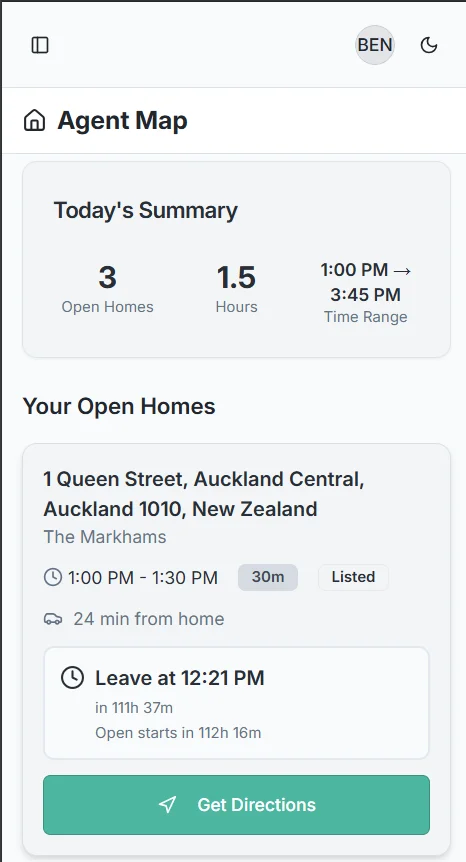
What Automatic Travel Time Calculation Looks Like
Modern real estate scheduling tools with travel time calculations integrate directly with mapping services like Google Maps. When you schedule appointments, the system automatically:
- Calculates the exact drive time between consecutive properties
- Uses real-time traffic data to estimate Saturday afternoon conditions
- Adds appropriate buffer time for setup, parking, and transitions
- Displays the travel time visually on your schedule grid
- Warns you when appointments are too close together
- Suggests optimal gaps between open homes based on actual driving distances
Instead of mentally calculating whether you have enough time, you simply look at your visual schedule and see immediately: "45-minute drive between these properties" or "Not enough time–reschedule." The cognitive load disappears, replaced by clear, actionable information.
Real-Time Traffic Integration
The best systems don't just show you average drive times–they account for real-world traffic conditions. The system knows that Saturday afternoon traffic is different from Tuesday morning traffic. It knows which roads get congested during sporting events. It factors in construction delays and road closures.
This real-time awareness means your travel time estimates are accurate and reliable, not optimistic guesses. You can trust your schedule because it's built on actual data, not hopeful assumptions.
Visual Travel Time Display
Numbers on a screen aren't enough–you need visual clarity. The best travel time systems use color coding and visual indicators to show you at a glance whether your schedule is realistic:
- Green indicators: Plenty of time between appointments, comfortable schedule
- Yellow warnings: Tight schedule, requires efficient transitions
- Red alerts: Impossible schedule, not enough time to travel between properties
This visual feedback lets you build realistic schedules without doing any mental math. You simply adjust appointments until all indicators are green or yellow, ensuring your day is actually achievable.
Practical Applications: Building Better Schedules
Here's how automatic travel time calculations transform your scheduling workflow in practice:
Morning Planning Sessions
Start your week by reviewing upcoming weekend schedules. With travel time visibility, you can quickly identify problems before they happen. That cluster of open homes on Saturday afternoon that looked fine on paper? The travel time calculations reveal you've only got 20 minutes between properties that are 40 minutes apart. You catch and fix the problem Monday morning instead of discovering it Saturday afternoon when it's too late.
Geographic Clustering
Travel time data helps you understand the geography of your listings. Instead of scheduling properties randomly, you can cluster appointments by area. Schedule all your eastern suburb properties together, then move to the city center, then head to the western suburbs. This geographic routing minimizes total drive time and maximizes your efficiency.
The system can even suggest optimal geographic routing automatically. Instead of you figuring out the most efficient order, the AI analyzes all your properties and suggests the sequence that minimizes total travel time while respecting appointment constraints.
Team Coordination
For teams, travel time visibility becomes even more valuable. When assigning open homes to agents, you can consider not just availability but also which agent is geographically positioned to cover multiple nearby properties. An agent who lives in the northern suburbs shouldn't be assigned properties scattered across the entire city–that's a recipe for stress and late arrivals.
The system can help you optimize team assignments based on both schedule availability and geographic efficiency. This reduces total team drive time, increases morale (nobody wants to spend hours in traffic), and improves service quality (agents arrive on time and energized rather than late and stressed).
Client Communication
When vendors ask about open home timing, you can give them confident, realistic answers. Instead of "I think we can fit you in at 3:00 PM," you can say, "Based on your property location and my existing schedule, 3:30 PM gives us the proper time for travel and setup, ensuring I'm there on time and fully prepared." This professionalism reassures vendors that you're organized and reliable.
Implementation Tips: Getting Started with Travel Time Calculations
Ready to implement travel time calculations in your scheduling? Here are practical tips for success:
1. Choose Purpose-Built Tools
Generic calendar apps don't calculate travel time–they just show time blocks. Look for scheduling tools specifically designed for real estate that understand the unique challenges of open home coordination. These tools integrate with mapping services and automatically calculate drive times based on actual property addresses.
2. Add Buffer Time
Even with automatic calculations, always add buffer time. Set the system to include 15-20 minutes beyond the estimated drive time. This accounts for unexpected delays, parking challenges, and the reality that technology isn't perfect. Better to have extra time than to be cutting it too close.
3. Review Schedules the Night Before
Friday evening, review your Saturday schedule one final time. Check that all travel times still make sense. Traffic patterns change, construction projects start, and events happen. A quick review ensures your schedule remains realistic even if conditions have changed since you originally created it.
4. Learn Your Travel Time Patterns
Over time, you'll develop intuition about which routes take longer than maps suggest and which areas have reliable travel times. Use this knowledge to refine your buffer times. Maybe that bridge crossing always adds 10 extra minutes on weekends–build that knowledge into your scheduling decisions.
5. Communicate Realistic Times to Vendors
When vendors request specific open home times, use travel time data to have honest conversations. If they want 2:00 PM but your schedule shows that's impossible given travel time, explain why and suggest alternatives. Most vendors appreciate the honesty and professionalism rather than you agreeing to an impossible schedule and arriving late.
The Future: AI-Powered Route Optimization
Travel time calculations are just the beginning. The next generation of real estate scheduling tools uses AI to go beyond showing you travel times–they actively optimize your entire schedule for efficiency.
Imagine asking in plain English: "When should I schedule the open home at 123 Main Street this weekend?" The AI analyzes your existing schedule, calculates travel times from all potential time slots, considers traffic patterns, factors in your home base location, and suggests the optimal times: "I recommend 2:30 PM on Saturday. This fits between your 12:00 PM and 4:30 PM appointments with comfortable travel time, and avoids the rush hour traffic from your 4:30 PM location."
This level of intelligent assistance eliminates the mental overhead of scheduling entirely. You don't need to be a route planning expert–the AI handles it for you, ensuring every schedule is optimized for minimal travel time and maximum efficiency.
Transform Your Weekend Scheduling Today
Travel time visibility isn't a luxury–it's essential for modern real estate scheduling. The difference between agents who consistently arrive on time, relaxed and prepared, and agents who are always rushing, apologizing, and stressed often comes down to one thing: proper travel time planning.
Manual travel time calculations are tedious and error-prone. Automatic travel time systems make realistic scheduling effortless. You spend less time calculating, less time stressed in traffic, and more time focused on what matters: selling properties and building relationships with clients.
If you're ready to stop underestimating drive times and start building schedules that actually work in the real world, consider tools specifically designed for real estate scheduling. AgentMap includes automatic travel time calculations with real-time traffic data, visual schedule displays, conflict warnings, and AI-powered route optimization–everything you need to transform weekend chaos into calm, achievable schedules.
See Your Travel Times at a Glance
Stop guessing about drive times. AgentMap shows you exactly how long it takes to get between properties.
Get Early AccessKey Takeaways
- Underestimating travel time is one of the most common real estate scheduling mistakes
- Weekend traffic patterns differ significantly from weekday traffic
- Hidden time costs (setup, parking, lock-up) add 20-40 minutes per transition
- Poor travel time planning leads to lost buyers, vendor frustration, and agent burnout
- Automatic travel time calculations remove the guesswork and mental overhead
- Real-time traffic integration provides accurate, reliable estimates
- Visual travel time displays make it easy to spot scheduling problems at a glance
- AI-powered route optimization can suggest optimal appointment timing automatically
Related Articles
How to Prevent Double-Booking Open Homes
Learn how visual scheduling helps prevent conflicts and eliminate double-booking disasters for real estate teams.
Multi-Weekend Open Home Campaigns: The Complete Guide
Discover how to coordinate listings across multiple weekends and update schedules efficiently when vendors make changes.