Multi-Weekend Open Home Campaigns: The Complete Guide to Coordinating Listings Across Multiple Weekends
Stop hunting through spreadsheets when vendors change their minds. Learn how to manage multi-weekend open home campaigns efficiently, update linked schedules instantly, and maintain sanity when dealing with complex listing schedules.
It's Tuesday afternoon, and your phone rings. It's Mrs. Henderson about her property at 45 Oak Street. "I know we scheduled open homes for the next four Saturdays," she says, "but I need to change them all to Sundays instead. My daughter's wedding got moved, and I'll be out of town every Saturday for the next month."
Your heart sinks. You have four weekends of open homes already scheduled, coordinated with your team, advertised online, and integrated with other listings. Now you need to find them all in your calendar, update each one individually, notify your team, update your marketing, and hope you don't miss any. One small mistake, and you'll show up to an empty property while disappointed buyers wait at the old time.
This is the nightmare of multi-weekend campaigns without proper coordination tools. In this comprehensive guide, we'll explore why multi-weekend campaigns are so challenging, what happens when they're not managed properly, and how campaign linking features can transform this chaos into simple, efficient management.
Why Multi-Weekend Campaigns Are Uniquely Challenging
Unlike one-off open homes, multi-weekend campaigns create complexity that grows exponentially with each additional weekend. Here's why they're so difficult to manage:
The Fragmentation Problem
When you schedule the same property across four consecutive Saturdays, traditional calendar systems treat these as four separate, unrelated appointments. There's no indication that these open homes are part of a coordinated campaign. When you need to change something about the listing–the time, the day, the assigned agent–you must manually hunt down all four instances and update them individually.
The problem gets worse as campaigns overlap. You might have 10-15 active properties, each with 3-4 weekends of open homes scheduled. That's 40-60 individual calendar entries for what are really just 10-15 listings. Your calendar becomes a maze of disconnected entries, and making changes requires detective work to figure out which entries belong together.
Vendor Mind Changes (and Why They're Inevitable)
Vendors change their minds constantly, and usually with good reason: family emergencies, work commitments, travel plans, health issues, or simple availability preferences. Some vendors realize after the first open home that Sundays work better than Saturdays for their family. Others need to move times earlier or later based on personal schedules. These aren't unreasonable requests–they're the reality of working with real people with real lives.
The challenge is that when a vendor asks to change their campaign schedule, they're not thinking about your calendar complexity. They're thinking, "just move everything to Sunday instead of Saturday." But for you, that simple request means finding and updating four separate calendar entries, notifying team members, updating online listings, adjusting coordination with other properties, and hoping you don't miss any piece of the puzzle.
Team Coordination Across Weeks
Multi-weekend campaigns often involve multiple team members across different weeks. Maybe Sarah covers week one, James covers week two, and you cover weeks three and four. When the campaign schedule changes, you need to notify all three people, re-coordinate coverage, check everyone's availability for the new times, and potentially reassign responsibilities.
Without linked campaign management, this coordination requires email chains, text messages, and multiple back-and-forth conversations. It's time-consuming, error-prone, and frustrating for everyone involved. Team members get confused about whether the change applies to just their week or all weeks. Communication breakdowns lead to scheduling conflicts and no-shows.
Marketing and Advertising Consistency
Your multi-weekend campaign isn't just a scheduling exercise–it's backed by marketing efforts across multiple platforms. Online listings, social media posts, newspaper ads, and signage all reference your open home times. When the schedule changes, you need to update all these marketing materials consistently. Miss one update, and you'll have buyers showing up at the wrong time based on outdated information they found online.
The Real Cost of Poor Campaign Management
Mismanaging multi-weekend campaigns creates problems that compound over time, affecting your business, your reputation, and your sanity.
Missed Updates and Scheduling Disasters
The most common problem is simply missing one of the updates when a campaign schedule changes. You update three of the four Saturday open homes to Sunday, but accidentally miss the fourth. Come that fourth Saturday, you show up to the property out of habit, while buyers are expecting a Sunday open home based on your updated advertising. You've wasted your time, confused your buyers, and looked disorganized to your vendor.
These mistakes aren't rare–they're endemic to managing campaigns with disconnected calendar entries. When you have dozens of open homes across multiple weeks, the probability of missing an update approaches certainty. It's not a matter of if you'll make a mistake, but when.
Time Wasted on Administrative Tasks
Even when you don't make mistakes, the sheer time required to manage campaign changes is staggering. Finding all related entries in your calendar, updating each one individually, notifying affected team members, and synchronizing changes across marketing materials can easily consume 30-60 minutes per campaign change. Multiply that across multiple listings making multiple changes, and you're spending hours each week on pure administrative overhead.
This time doesn't add value–it's not prospecting, not showing properties, not negotiating deals. It's just keeping your calendar accurate. For high-performing agents, this administrative burden represents opportunity cost measured in tens of thousands of dollars annually.
Vendor Frustration and Relationship Damage
When vendors make reasonable scheduling requests and then discover you've made mistakes implementing those changes, trust erodes quickly. They asked for something simple–move everything to Sunday–and you showed up on Saturday anyway, or updated week one but not week two, or changed the time but forgot to tell the team.
Vendors don't understand that your calendar system makes these changes complex. From their perspective, you're just disorganized. This perception damages your professional reputation and makes vendors less likely to recommend you to friends or give you future listings.
Team Morale and Communication Breakdown
For your team members, dealing with constantly shifting campaign schedules without proper coordination tools is exhausting. They receive fragmented information: "The Saturday open home at 45 Oak Street moved to Sunday" without clarity about whether this affects just this week or all remaining weeks. They show up at wrong times, find out about changes too late, and feel like they're constantly playing catch-up.
The Solution: Campaign Linking and Bulk Updates
Modern real estate scheduling tools solve the campaign problem elegantly through campaign linking–connecting all open homes for the same property into a unified campaign that can be updated together.
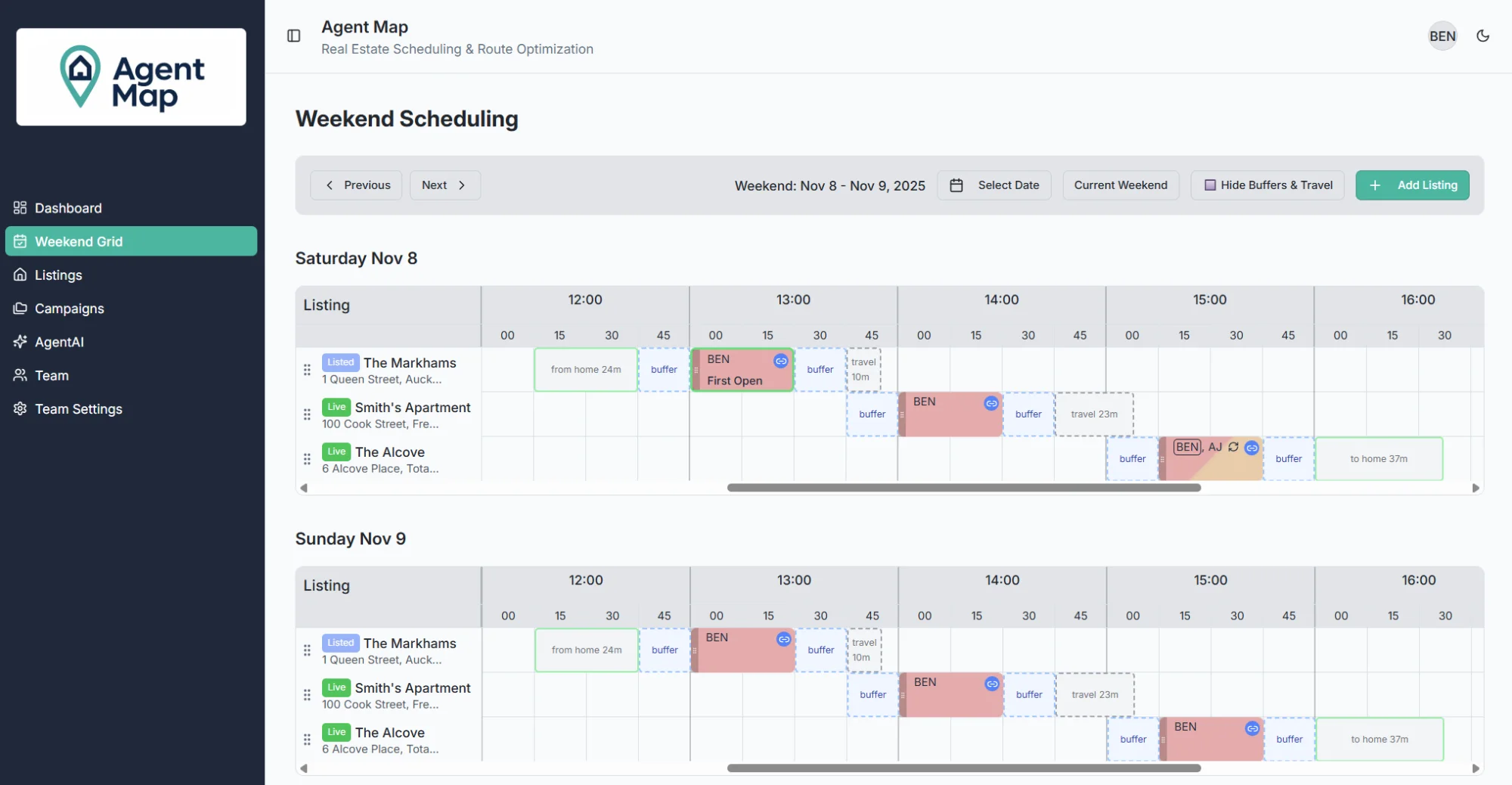
How Campaign Linking Works
Instead of treating four Saturday open homes as four separate calendar entries, campaign-aware systems let you define them as a single campaign: "45 Oak Street - Multi-Weekend Campaign." All four open homes are linked together, identified as part of the same listing campaign.
When you need to make changes, you update the campaign, not individual open homes. Want to move all open homes from Saturday to Sunday? One click updates the entire campaign. Need to change the time from 1:00 PM to 2:00 PM? One change applies to all linked open homes. Want to reassign all remaining weekends to a different team member? One update, instant coordination.
Selective and Bulk Updates
The best campaign management systems offer flexibility. Sometimes you want to update all remaining open homes in a campaign. Other times, you only want to update future weeks while leaving past weeks unchanged. The system should let you choose:
- Update all: Changes every open home in the campaign, including past ones (for record-keeping)
- Update remaining: Changes only future open homes, leaving completed ones unchanged
- Update specific weeks: Cherry-pick which open homes to update while leaving others unchanged
This flexibility handles real-world scenarios. If a vendor wants to change week three but keep weeks one, two, and four the same, you can do that. If they want to cancel the entire remaining campaign, you can do that. The tool adapts to your needs instead of forcing you to work around its limitations.
Automatic Team Notifications
When you update a campaign, affected team members automatically receive notifications. They don't need to hunt through email chains or check a shared calendar hoping they didn't miss something. They get clear, actionable notifications: "The 45 Oak Street campaign has moved from Saturday to Sunday for all remaining weeks. Your assigned week (November 9) is now Sunday, November 10 at 1:00 PM."
This automatic communication eliminates coordination overhead. Everyone affected by the change knows about it immediately, with full context about what changed and how it affects them personally. No ambiguity, no confusion, no missed information.
Visual Campaign Overview
Campaign linking provides a visual overview of all your multi-weekend campaigns in one place. You can see at a glance which properties have active campaigns, how many weekends remain, when the next open home is scheduled, and which team members are assigned to which weeks. This big-picture view helps you manage multiple campaigns simultaneously without drowning in calendar details.
Practical Campaign Management Strategies
With campaign linking tools in place, here's how to implement effective multi-weekend campaign management:
1. Set Up Campaigns at Listing Time
When you take on a new listing, discuss the campaign strategy with the vendor upfront. How many weekends do they want? What days work best? What times? Create the entire campaign in one session, establishing the baseline schedule for all weeks simultaneously.
This upfront planning establishes expectations and makes subsequent changes easier because everyone understands the original plan. Vendors appreciate the organized approach, and you establish yourself as a professional who thinks ahead.
2. Build in Flexibility
When setting up campaigns, acknowledge that changes will happen. Tell vendors, "I'll schedule these four weekends, and we can adjust as we go based on how the campaign progresses." This frames changes as normal and expected rather than disruptive problems.
Choose scheduling patterns that allow flexibility. If possible, schedule campaigns for consistent times (every Saturday at 1:00 PM) rather than varying times each week. Consistent patterns make it easier to update everything at once if needed.
3. Review Campaigns Weekly
Make it a weekly habit to review all active campaigns. Check that upcoming open homes still make sense, verify team assignments are current, and proactively reach out to vendors about next week's open home. This regular review catches potential problems early and demonstrates attentiveness to your vendors.
4. Document Campaign Performance
Use campaigns as an opportunity to track performance across weeks. How many buyers attended each week? What feedback did you receive? Are interest levels increasing or decreasing? This data helps you advise vendors about campaign effectiveness and justify recommendations about extending or concluding campaigns.
5. Train Your Team on Campaign Protocols
Establish clear team protocols for campaign management. Who has authority to change campaign schedules? How are team members notified of changes? What's the process for handling vendor requests? Clear protocols prevent confusion and ensure consistent, professional handling of campaigns across your entire team.
Advanced Campaign Management: Scenarios and Solutions
Let's walk through common campaign scenarios and how proper campaign management handles them:
Scenario 1: Vendor Wants to Change All Remaining Weeks
Situation: Your vendor calls Tuesday morning asking to move all remaining Saturday open homes to Sunday because of a recurring family commitment.
Traditional Approach: Find all remaining Saturday entries, update each one to Sunday individually (hoping you don't miss any), notify each assigned team member separately, update marketing materials property by property.
Campaign Approach: Select the campaign, choose "update remaining weeks," change day from Saturday to Sunday, confirm. All future open homes update instantly, affected team members receive automatic notifications, marketing feeds update automatically. Total time: 2 minutes.
Scenario 2: Mid-Campaign Agent Reassignment
Situation: The agent assigned to weeks 3 and 4 of a campaign unexpectedly goes on medical leave. You need to reassign those weeks to available team members.
Traditional Approach: Find the specific weeks in the calendar, manually change the assigned agent on each one, contact the original agent to confirm they know they're off the schedule, contact the new agents to brief them on the property.
Campaign Approach: View the campaign overview, select weeks 3 and 4, reassign to new agents with a single action. Original agent receives automatic notification they've been removed, new agents receive automatic briefing notifications with property details and schedule. Total time: 3 minutes.
Scenario 3: Extending a Successful Campaign
Situation: Your original four-week campaign is generating strong interest, but no offers yet. The vendor wants to extend for two more weeks using the same pattern.
Traditional Approach: Manually create two new calendar entries, ensuring they match the pattern of previous weeks (same day, same time), assign team members, hope you got the details right.
Campaign Approach: Select the campaign, choose "extend campaign," specify two additional weeks. System automatically creates two new open homes matching the established pattern, prompts for team assignments, updates campaign overview. Total time: 2 minutes.
Scenario 4: Campaign Cancellation
Situation: Great news–the property sold! You need to cancel all remaining open homes in the campaign.
Traditional Approach: Hunt through your calendar for all remaining open homes related to this property, delete or cancel each one individually, notify each assigned team member, update online listings, cross your fingers you didn't miss any.
Campaign Approach: Select the campaign, choose "cancel remaining weeks," confirm. All future open homes are cancelled, all assigned team members receive automatic notifications, marketing feeds update automatically. Total time: 1 minute.
The Future: AI-Powered Campaign Optimization
Campaign linking is powerful, but the next generation of tools goes further with AI-powered campaign management. Instead of you figuring out optimal campaign schedules, AI analyzes historical data and market conditions to make intelligent recommendations.
Imagine asking: "What's the best campaign schedule for this property?" The AI considers factors like neighborhood patterns, seasonal trends, your team's availability, competing listings, and historical performance to suggest: "I recommend four consecutive Sundays from 1:00-2:30 PM. Sunday afternoons in this neighborhood see 40% more buyer traffic than Saturdays, and 1:00 PM is optimal based on recent campaigns in this price range."
This intelligent assistance removes guesswork and helps you create campaigns backed by data rather than intuition. You still make final decisions, but you're armed with insights that increase your chances of campaign success.
Transform Your Campaign Management Today
Multi-weekend open home campaigns don't have to be administrative nightmares. With proper campaign linking and bulk update tools, managing complex multi-week schedules becomes simple, efficient, and stress-free.
The difference between agents who handle campaign changes gracefully and agents who constantly scramble to fix scheduling mistakes often comes down to tools. Campaign-aware scheduling systems transform what used to take 30-60 minutes into tasks that take 2-3 minutes. They eliminate errors, improve team coordination, and let you confidently handle vendor schedule changes without breaking a sweat.
If you're tired of hunting through calendars to update campaigns and ready to handle multi-weekend schedules efficiently, consider purpose-built tools designed for real estate campaign management. AgentMap's campaign features let you link open homes across multiple weekends, update entire campaigns with single actions, automatically notify affected team members, and handle vendor schedule changes in minutes instead of hours.
Update Entire Campaigns in One Click
Stop updating open homes one by one. See how AgentMap's campaign linking saves you hours every week.
Get Early AccessKey Takeaways
- Multi-weekend campaigns create administrative complexity with traditional calendar tools
- Vendor schedule changes are inevitable and need efficient handling
- Campaign linking connects related open homes for unified management
- Bulk updates let you change entire campaigns with single actions
- Automatic team notifications eliminate coordination overhead
- Visual campaign overviews provide big-picture management visibility
- Proper campaign management saves 30-60 minutes per schedule change
- AI-powered optimization can suggest ideal campaign schedules based on data