How to Prevent Double-Booking Open Homes: The Visual Scheduling Solution
Stop the chaos of overlapping schedules and discover how visual scheduling helps real estate agents prevent conflicts, coordinate teams, and eliminate double-booking disasters.
It's 10 AM on a Saturday morning, and you suddenly realize you've scheduled two open homes at the same time. Worse, they're 45 minutes apart. Your phone is ringing off the hook with confused prospective buyers, your vendors are furious, and you're scrambling to find coverage while racing across town. Sound familiar?
Double-booking open homes is one of the most common–and most embarrassing–mistakes real estate agents make. According to industry surveys, over 60% of agents have accidentally double-booked appointments at least once, and for team coordinators managing multiple agents, that number jumps to nearly 80%. The consequences go beyond embarrassment: lost client trust, damaged vendor relationships, and missed sales opportunities can cost thousands of dollars.
But here's the good news: double-booking is entirely preventable with the right approach. In this comprehensive guide, we'll explore why double-booking happens, the true cost of scheduling conflicts, and most importantly, how visual scheduling systems can help you eliminate these problems forever.
Why Double-Booking Happens (And Why Spreadsheets Make It Worse)
Most real estate agents don't intend to double-book open homes–it happens because traditional scheduling methods simply aren't designed for the complexity of modern real estate coordination. Here are the most common causes:
The Spreadsheet Problem
Many agents still rely on spreadsheets for scheduling. While spreadsheets are flexible, they're terrible at showing you scheduling conflicts at a glance. When you're looking at rows of data with times, addresses, and agent names, it's incredibly easy to miss that two entries overlap. Your brain has to manually process each row, calculate time conflicts, and remember which agent is where–all while juggling phone calls and client meetings.
The problem gets exponentially worse when you're managing a team. With multiple agents, multiple properties, and multiple weekends to coordinate, a spreadsheet quickly becomes an impossible puzzle. One small data entry error, one forgotten update, and suddenly you have a scheduling disaster.
The Hidden Travel Time Trap
Even more insidious than pure double-booking is the travel time trap. You might schedule two open homes at 1:00 PM and 2:30 PM, thinking you have plenty of time. But when you account for the actual drive time between properties (especially with Saturday traffic), plus time to lock up, get to your car, and set up at the next location, that 90-minute gap becomes impossible.
This is technically a form of double-booking–you've committed to being two places with insufficient time between them. The result is the same: frantic phone calls, disappointed buyers, and damage to your professional reputation. Traditional calendar tools don't show you this conflict because technically the appointments don't overlap on paper. But in reality, you're double-booked.
Last-Minute Changes and Poor Communication
Real estate is unpredictable. Vendors change their minds, open homes get rescheduled, properties come on and off the market, and agents call in sick. When you're using multiple systems–a personal calendar, a team spreadsheet, text messages, and email–it's incredibly difficult to ensure everyone has the most current information.
One agent updates their calendar but forgets to update the team spreadsheet. Another agent sees the old schedule and books themselves into a time slot that's already taken. By the time anyone realizes the conflict, it's too late to fix it without causing problems.
The True Cost of Double-Booking
Before we dive into solutions, it's worth understanding exactly what double-booking costs you–because the damage goes far beyond one missed open home.
Lost Sales Opportunities
When you can't attend a scheduled open home, you're not just inconveniencing buyers–you're potentially losing sales. Serious buyers who show up to a locked property or a "sorry, cancelled" sign often move on to the next listing. They don't wait around for you to reschedule. If your property was their second choice, they might make an offer on their first choice instead. That's a potential commission lost forever.
Damaged Vendor Relationships
Your vendors trust you to sell their property. When you fail to show up for an open home they're counting on, that trust evaporates quickly. Vendors talk to their friends, leave reviews, and share their experiences on social media. One scheduling mistake can cost you not just that listing, but future business from their network.
Team Morale and Coordination Issues
For team coordinators, double-booking doesn't just affect you–it affects your entire team. When one agent can't cover their scheduled open home, someone else has to scramble to fill in. This creates resentment, stress, and a chaotic work environment. Over time, chronic scheduling problems lead to high turnover and difficulty recruiting new team members.
Your Professional Reputation
Real estate is a reputation business. Buyers and vendors expect professionalism and reliability. Every double-booking incident chips away at your credibility. In a competitive market, your reputation is everything–and it takes years to build but only moments to damage.
The Visual Scheduling Solution: See Conflicts Before They Happen
The fundamental problem with traditional scheduling methods is that they're not visual. You're forced to mentally process times, locations, and conflicts instead of seeing them instantly. This is where visual scheduling systems transform your workflow.
What Makes Visual Scheduling Different?
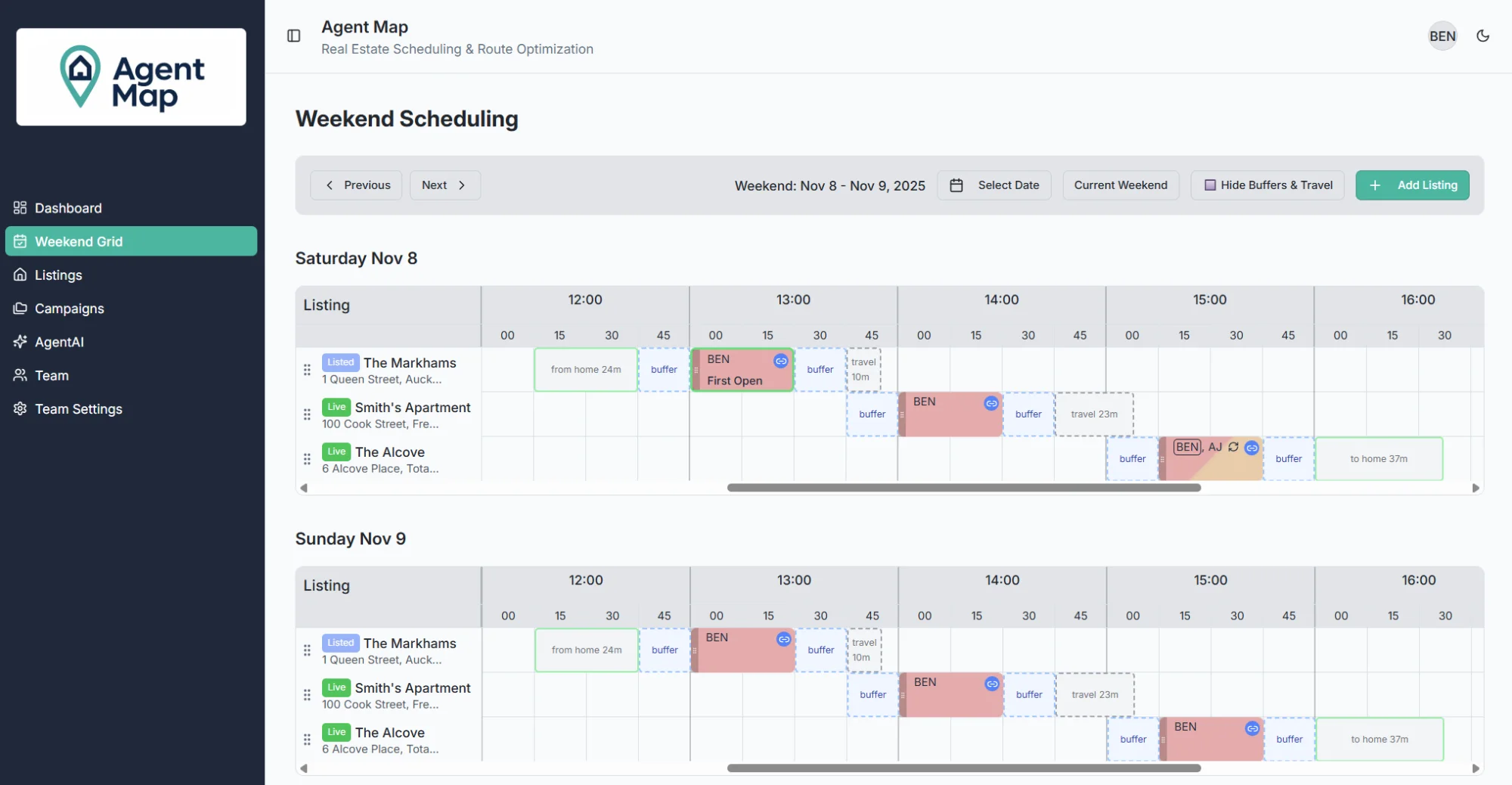
Visual scheduling presents your appointments in a grid or calendar format where conflicts are immediately obvious. Instead of scanning rows in a spreadsheet, you see a visual representation of your day or week. When two appointments overlap, the conflict is visually apparent–you can't miss it.
But modern visual scheduling goes far beyond just showing time blocks. The best systems include:
- Automatic conflict detection: The system actively prevents you from creating overlapping appointments
- Travel time visibility: See not just appointment times, but the drive time between properties
- Color coding: Quickly identify which agent is assigned to which property
- Real-time updates: When one schedule changes, everyone sees the update immediately
- Buffer time management: Automatically account for setup, cleanup, and transition time
How Travel Time Visibility Prevents Hidden Double-Booking
Remember the travel time trap we mentioned earlier? Visual scheduling systems with built-in travel time calculations solve this problem elegantly. Instead of guessing how long it takes to get from one property to another, the system calculates it for you using real-time traffic data.
When you try to schedule an appointment too close to the previous one, the system shows you a warning: "Not enough travel time between open homes." This visual indicator prevents you from creating impossible schedules before they become problems. You can see at a glance whether you have 15 minutes or 45 minutes of drive time–critical information for realistic scheduling.
Team Coordination Made Simple
For teams, visual scheduling becomes even more powerful. A good system lets you see all agents' schedules simultaneously in one view. Instead of juggling multiple calendars or calling each team member to check availability, you have a complete picture of who's available when.
Color-coded agent assignments make it easy to spot gaps in coverage or overloaded schedules. You can drag and drop appointments to reassign them, and everyone sees the changes instantly. No more email chains, no more "did you get my text?", no more version control nightmares with shared spreadsheets.
Practical Tips for Implementing Visual Scheduling
Switching to a visual scheduling system is the single best thing you can do to prevent double-booking. Here are practical steps to make the transition smooth:
1. Choose the Right Tool for Your Needs
Not all visual scheduling tools are created equal. Look for systems specifically designed for real estate open home coordination. Generic calendar apps don't understand the unique challenges of real estate scheduling–multiple properties, team coordination, travel time calculations, and campaign management across multiple weekends.
2. Build in Buffer Time
Even with automatic travel time calculations, always build in buffer time. Plan for 15-20 minutes more than the estimated drive time. This accounts for unexpected traffic, time to lock up the previous property, and time to set up at the next location. Better to arrive early than to stress about being late.
3. Use Campaigns for Multi-Weekend Listings
When you have properties with open homes scheduled across multiple weekends, group them into campaigns. This way, if a vendor wants to change their schedule, you can update all related open homes at once instead of hunting through your calendar to find each instance. This dramatically reduces the chance of missing an update that could lead to double-booking.
4. Establish Team Protocols
If you work with a team, establish clear protocols for schedule changes. Designate one person (or a clear process) for making schedule updates. Make it a rule that no one schedules themselves without checking the visual schedule first. Train everyone to look for the visual conflict warnings and take them seriously.
5. Review Your Schedule Daily
Even with the best visual scheduling system, make it a habit to review your schedule every morning. Look at the day ahead, verify travel times make sense, and confirm you haven't missed any last-minute changes. This daily check takes five minutes but can save you from major problems.
The Future: AI-Powered Scheduling
Visual scheduling is powerful, but the next generation of tools takes it even further with AI assistance. Instead of manually figuring out optimal time slots, you can simply ask: "When can I schedule an open home at 123 Main Street?" The AI analyzes your existing schedule, calculates travel times, considers team availability, and suggests the best options in plain English.
This eliminates the mental load of scheduling entirely. You're not just prevented from making mistakes–you're actively guided toward optimal choices. The system becomes a scheduling assistant that understands real estate workflows and makes intelligent suggestions based on real-world constraints.
Your Next Steps
Double-booking open homes is frustrating, expensive, and entirely preventable. The solution isn't working harder or being more careful–it's working smarter with tools designed specifically for your needs.
Visual scheduling systems transform chaos into clarity. When you can see your entire schedule at a glance, spot conflicts before they happen, and coordinate with your team in real-time, double-booking becomes a thing of the past. Your weekends become calmer, your vendors are happier, and you can focus on what you do best: selling properties.
If you're tired of the scheduling chaos and ready to eliminate double-booking forever, consider trying a purpose-built solution like AgentMap. With visual weekend grids, automatic travel time calculations, team coordination tools, and AI-powered scheduling assistance, it's designed specifically to solve the unique challenges real estate agents face every weekend.
Ready to Stop Double-Booking Forever?
See how AgentMap's visual scheduling prevents conflicts before they happen.
Get Early AccessKey Takeaways
- Double-booking happens because traditional tools don't show conflicts visually
- Travel time between properties is a hidden form of double-booking that traditional calendars miss
- The cost of double-booking includes lost sales, damaged relationships, and reputation harm
- Visual scheduling systems prevent conflicts by making overlaps immediately obvious
- Travel time visibility helps you avoid creating impossible schedules
- Team coordination becomes simple when everyone sees the same real-time visual schedule
- AI-powered scheduling takes it further by suggesting optimal times automatically
Related Articles
Why Travel Time Calculations Matter for Real Estate Scheduling
Learn how automatic travel time calculations prevent over-scheduling and help you build realistic weekend schedules.
Multi-Weekend Open Home Campaigns: The Complete Guide
Discover how to coordinate listings across multiple weekends and update schedules efficiently when vendors make changes.