🚀 Launching Soon
Built for the Reality of Real Estate Weekends
From visual scheduling to travel time visibility, AgentMap has every tool busy professionals and teams need to coordinate professionally.
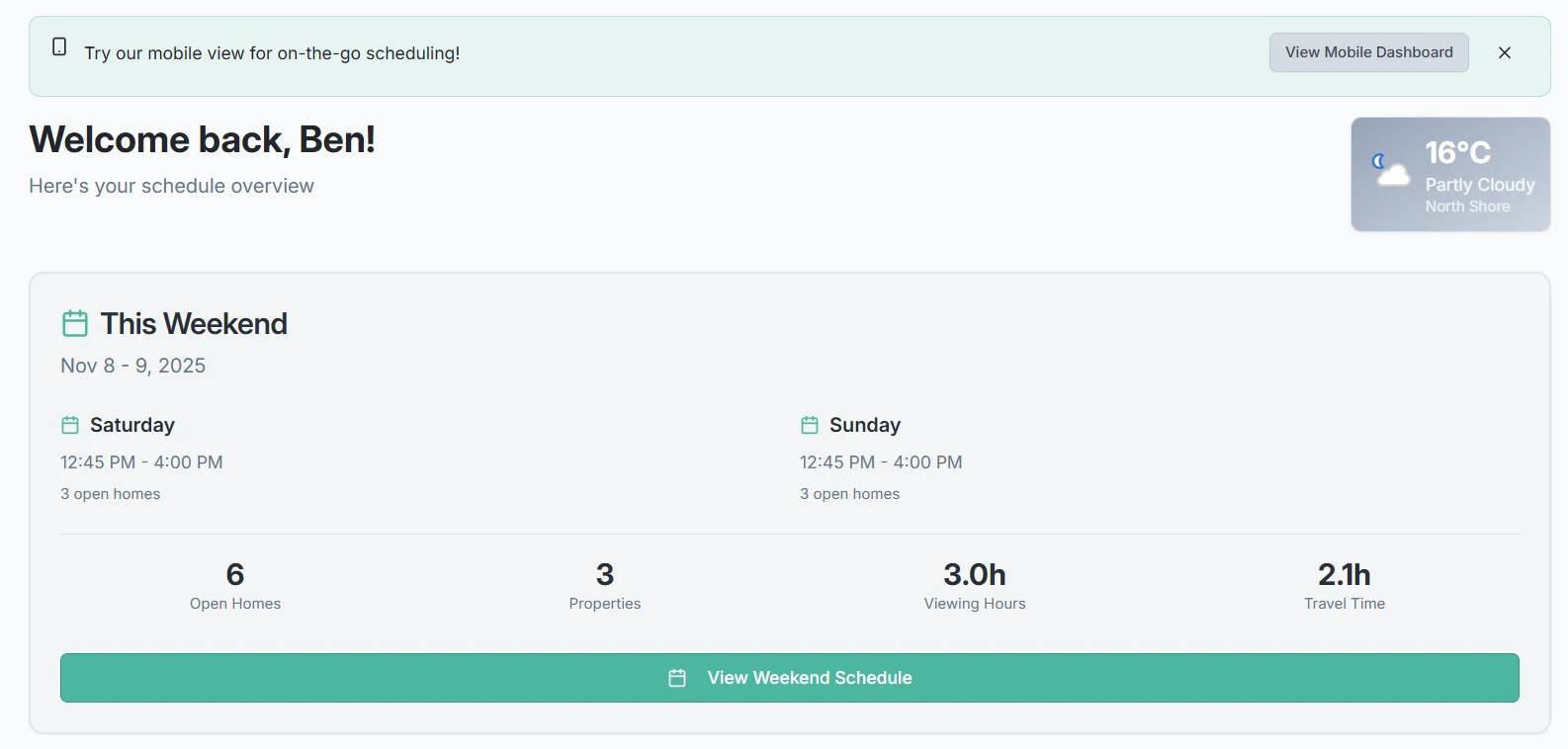
From visual scheduling to travel time visibility, AgentMap has every tool busy professionals and teams need to coordinate professionally.
See your entire weekend at a glance with our intuitive visual timeline interface.
Saturday and Sunday displayed side-by-side with 15-minute time slots from 7am to 8pm. See exactly when and where everyone is scheduled.
Easily adjust schedules by dragging open homes to different times or reordering listings for better visual organization.
Assign colors to agents or listings for instant visual recognition. See who's where without reading every label.
Overlapping schedules and double-bookings are highlighted instantly, preventing scheduling disasters before they happen.
Changes sync instantly across all devices. When one team member updates the schedule, everyone sees it immediately.
Toggle between viewing all agents or focus on specific team members. Filter by listing, agent, or time period.
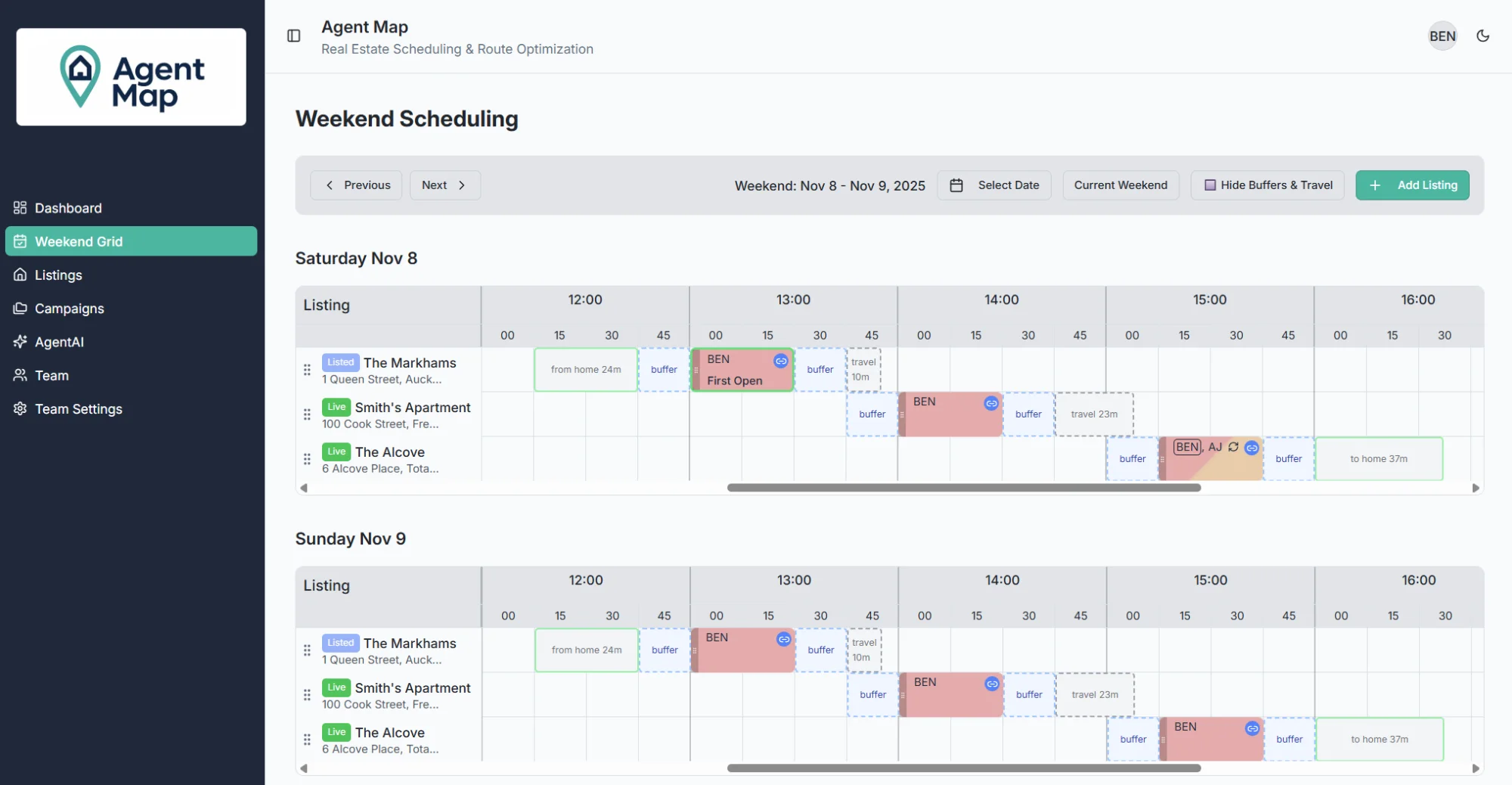
See exactly how long it takes to travel between properties. Prevent over-scheduling and ensure agents have enough time.
Leverages Google's powerful routing engine to calculate precise drive times between every property.
Accounts for typical weekend traffic patterns, construction, and road conditions for accurate time estimates.
Click one button to calculate travel times for all agents. See immediately if there are any scheduling conflicts.
See travel time displayed directly on the weekend grid as striped blocks between open homes, making gaps obvious.
Highlights when agents don't have enough time to travel between properties, preventing late arrivals and stress.
Calculations start from each agent's home address, ensuring realistic travel times for the first appointment.
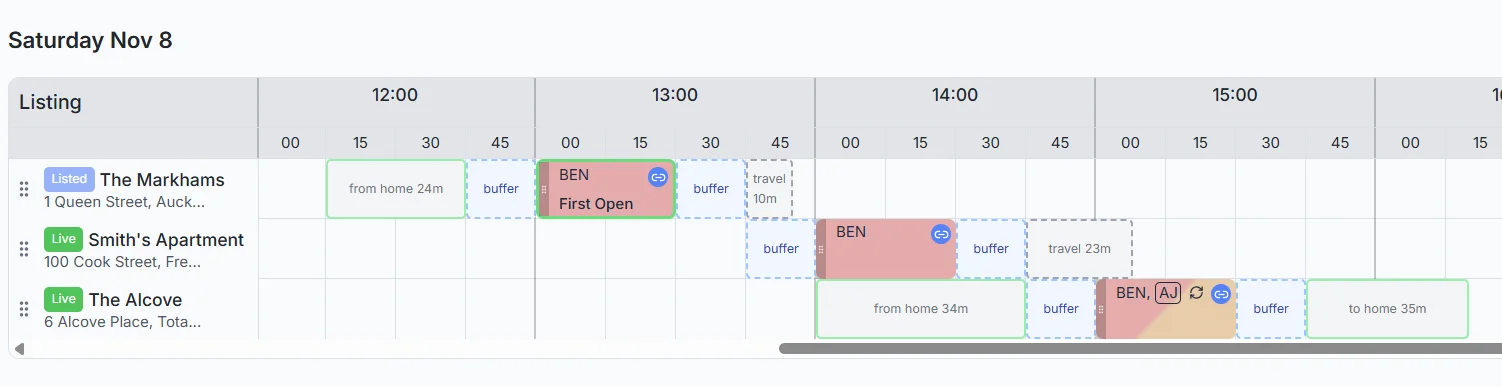
Never guess travel time again. Get precise estimates automatically.
Calculates exact minutes needed to travel from one open home to the next based on real roads and conditions.
Add setup time, parking, and buffer minutes to ensure agents arrive prepared, not rushed.
Automatically accounts for the end time of one showing plus travel before the start of the next.
Each agent gets individual travel time calculations based on their unique schedule and route.
Uses historical traffic data for Saturday and Sunday to provide realistic weekend estimates.
Intelligent caching speeds up repeated calculations while staying accurate with periodic updates.
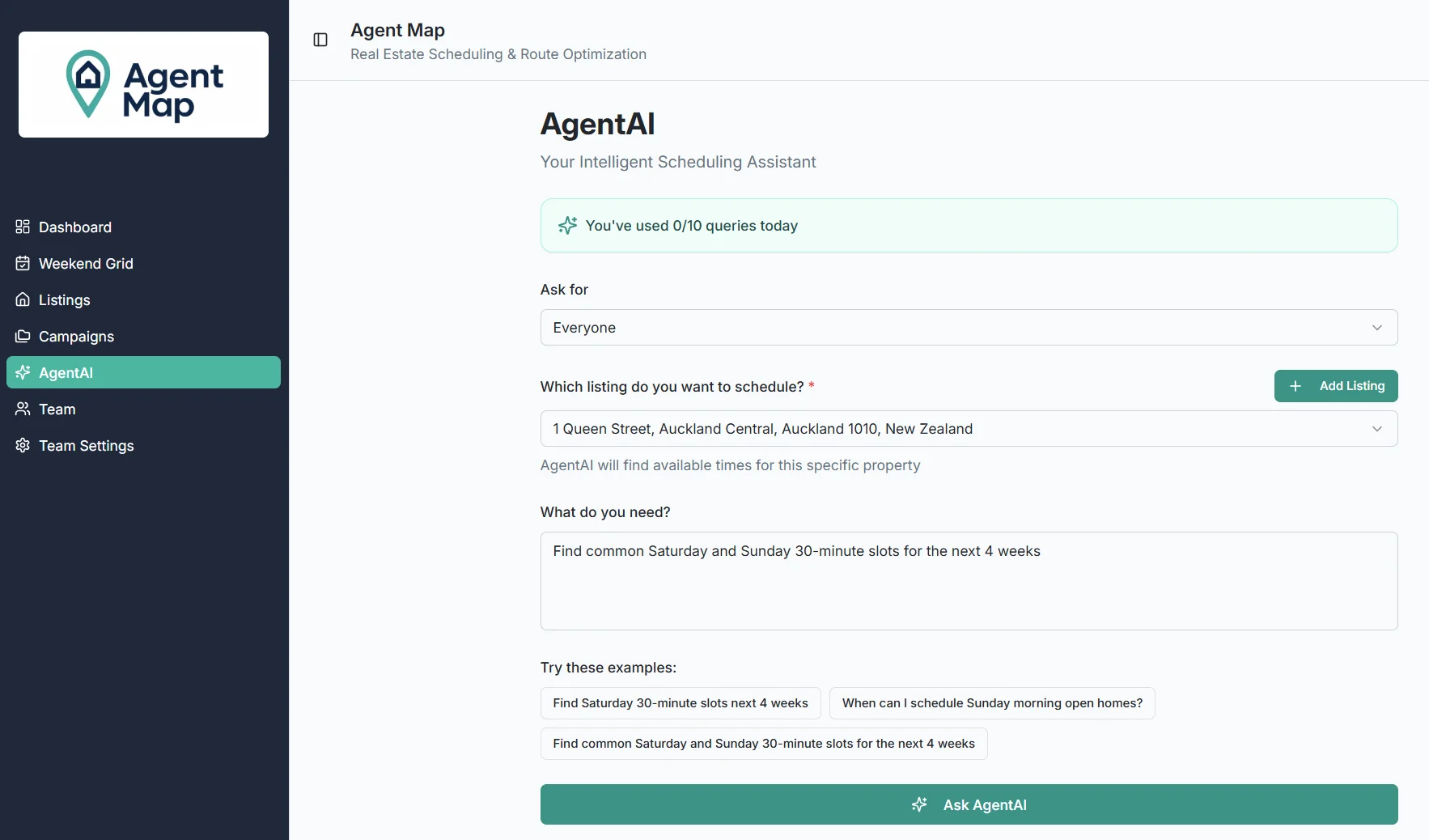
Say goodbye to manual schedule hunting. AgentAI is your intelligent scheduling copilot that finds perfect time slots in seconds.
Scans your entire team's schedule in seconds, analyzing thousands of potential time slots.
Returns 3-5 optimal time slots with clear explanations of why each option works best.
"This works because no conflicts + good travel time" - always know the reasoning behind suggestions.
Click your preferred suggestion and the campaign form automatically fills in all the details.
Manage your schedule solo or keep your entire team aligned without endless group chats.
Working solo or with a team? Assign yourself or multiple agents to each open home. See at a glance who's responsible for what.
Agents mark when they're unavailable, preventing scheduling conflicts before they happen.
Set repeating unavailable blocks (like family commitments) that apply every weekend automatically.
Agents receive notifications when assigned to new open homes or when schedules change.
Admin and agent roles ensure the right people have the right access. Perfect for solo agents or team leads who need control.
View your schedule or filter by team. Prevent conflicts and maintain clear organizational structure as you grow.
System warns you before creating double-bookings or scheduling conflicts—whether you're managing your own schedule or coordinating a team.
Centralized database for all your properties with full lifecycle tracking.
Store all listing details in one place: address, features, price, and more. No more scattered information.
Track listings through their journey: Active, Live, Listed, Sold, Withdrawn, or Archived.
Automatic geocoding converts addresses to coordinates for accurate mapping and travel calculations.
Assign yourself or specific team members to specific listings. Everyone knows their properties at a glance.
Create new open homes directly from the listing page with pre-filled property information.
See all your listings on an interactive map. Understand geographic distribution at a glance.
Switch between card-based grid view and detailed list view depending on your needs.
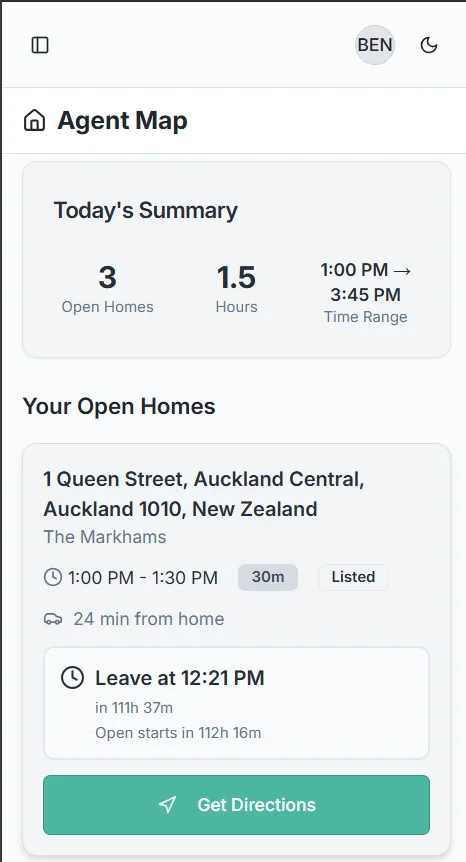
Full platform access from any device, anywhere, anytime.
Fully responsive interface adapts seamlessly to phones, tablets, and desktops.
Optimized for touch controls on mobile devices. Tap, swipe, and manage with ease.
Changes made on any device sync instantly. Always see the latest information.
Make schedule changes while you're out. No need to wait until you're back at your desk.
Works on iOS, Android, Windows, and Mac. Your team can use whatever devices they prefer.
View your schedule even when internet is spotty. Perfect for showing homes in remote areas.
Join our waitlist for exclusive early access and be among the first to experience AgentMap.
Learn more about how AgentMap features work
AgentMap uses Google Maps API with real-time traffic data to provide highly accurate travel time estimates. The system updates calculations based on current traffic conditions, time of day, and historical traffic patterns. You can also add custom buffer times to account for parking, property access, or other delays.
Yes! You can customize colors for different campaigns, reorder listings via drag-and-drop, filter by agent or property status, and adjust the time range displayed. The grid automatically saves your preferences and displays them consistently across devices.
The AI assistant analyzes your scheduling patterns, preferred time slots, typical buffer times, and agent availability to provide increasingly personalized suggestions. It learns which agents work well together, optimal spacing between appointments, and your team's scheduling preferences over time.
AgentMap's conflict detection immediately alerts you when two agents are scheduled for overlapping times at the same property. The system highlights conflicts visually on the weekend grid and suggests alternative time slots to resolve the conflict automatically.
Yes. Each agent can set weekly recurring availability blocks, mark specific dates as unavailable, and set preferred working hours. The scheduling system and AI assistant automatically respect these availability settings when suggesting time slots or creating schedules.
Calendar integration is planned for a future update. At launch, you'll be able to export your open home schedule to standard calendar formats (iCal/ICS) that work with Google Calendar, Outlook, and other calendar applications.
Large teams can use permission levels (admin, field agent, agent), filter views by specific agents or groups, and receive targeted notifications. Admins can manage all schedules while individual agents can only edit their own assignments. The system scales efficiently from solo agents to teams of 20+ members.
You can store addresses (automatically geocoded), property status (Active, Listed, Sold, etc.), field agent assignments, notes, and link multiple open homes to each listing. The map view displays all properties visually, and you can quickly create new open homes directly from any listing.
The mobile-responsive web app requires an internet connection for real-time updates and travel time calculations. However, you can view previously loaded schedules in read-only mode while offline. Any changes made offline will sync automatically when you reconnect.
AgentMap sends notifications for schedule changes, new assignments, conflict alerts, and upcoming open homes. You can customize notification preferences by type and delivery method (email, in-app). Admins receive additional notifications about team-wide changes and system updates.
Want to see these features in action?
Request Early Access